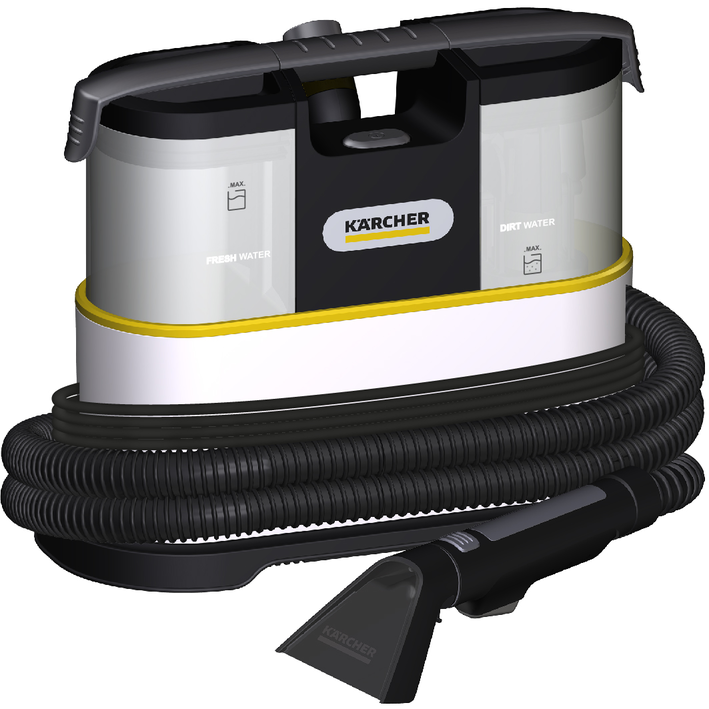
SE 2 Spot
97793900 (05/26)
97793900 (05/26)
 Read this safety chapter and these original instructions before using the device for the first time. Act in accordance with them. Keep the original instructions for future reference or for future owners.
In addition to the notes in the operating instructions, you also need to take into consideration the general safety regulations and accident prevention guidelines applicable by law.
Warnings and information notices attached to the device provide important information for hazard-free operation.
Indication of an imminent threat of danger that will lead to severe injuries or even death.
Indication of a potentially dangerous situation that may lead to severe injuries or even death.
Indication of a potentially dangerous situation that may lead to minor injuries.
Indication of a potentially dangerous situation that may lead to damage to property.
Wear suitable gloves when working with the device.
Risk of asphyxiation. Keep packaging film out of the reach of children.
Only use the device for its proper use. Take into account the local conditions and beware of third parties, in particular children, when working with the device.
Persons with reduced physical, sensory or mental capabilities and persons lacking experience and knowledge may only use the appliance if they are properly supervised, have been instructed on use of the appliance safely by a person responsible for their safety, and understand the resultant hazards involved.
Only people who have been instructed on how to use the device, or have proven their ability to operate it, and have been explicitly instructed to use it, must use the device.
Children must not operate the device.
Children must be supervised to prevent them from playing with the appliance.
Safety devices are provided for your own protection. Never modify or bypass safety devices.
Only connect the device to alternating current. The voltage indicated on the type plate must match the voltage of the power source.
Never touch the mains plug and socket with wet hands.
Only operate the device via a fault current protection switch (maximum 30 mA).
Never immerse the device, mains cable or mains plug in water or other liquids.
Only work with liquids (e.g. cleaning agents) if the device is connected to a socket protected with a fault current protection switch (maximum 30 mA).
Only connect the device to an electrical connection which has been set up by a qualified electrician as per IEC 60364‑1.
Switch off the device immediately in the event of leaks.
In case of any foam formation or escaping liquids, switch off the device immediately and remove the mains plug.
Check that the mains connection cable with mains plug is undamaged each time before using the device. To avoid any possible danger, a damaged mains connection cable must be immediately replaced by the manufacturer, or the authorised customer service department or a qualified electrician.
Do not damage the power supply and extension cable by running over it, crushing or yanking it or similar. Protect the power supply cable from heat, oil and sharp edges.
Unsuitable electrical extension cables can be dangerous. Only use electrical extension cables with a splash guard and a diameter of at least 3x1 mm2.
Only use the mains connection cable prescribed by the manufacturer, including when replacing the cable. For order no. and type see operating instructions.
Only replace couplings on the power supply or extension cable with those with the same splash guard and the same mechanical strength.
Do not use the device if it has been dropped beforehand, has received an impact or is visibly damaged. Have the device checked by the authorised Customer Service and repaired properly before using the device again. Internal malfunctions could impair the safety of the device.
Switch off the device and unplug the mains plug before performing cleaning/maintenance.
Have repair work and work on electrical components carried out by the authorised customer service only.
In case of longer breaks in operation and after use, switch off the device at the main switch / device switch and pull the mains plug.
Do not pull the mains plug out the socket using the power supply cable.
Do not carry/transport the device using the power supply cable.
When using the device in hazard zones (e.g. service stations), adhere to the respective safety regulations.
Operation in explosive atmospheres is prohibited.
Never use the device to extract any burning or smouldering objects.
Never spray or vacuum fluids, flammable gases, explosive dusts as well as undiluted acids and solvents. These include petrol, paint thinners or heating oil, which can form explosive vapours or mixtures through suction air turbulence, also acetone, undiluted acids and solvents because these attack the materials used in the machine.
Risk of explosion
Never use the device to vacuum up combustible gases, liquids or dusts.
Never use the device to vacuum up reactive metal dusts (e.g. aluminium, magnesium, zinc).
Never use the device to vacuum up undiluted brine or acids.
Never use the device to vacuum up any burning or smouldering objects/matter.
These substances can corrode the materials in use on the device.
Never use the device to vacuum up people or animals.
Do not suck in toxic substances.
Check the device and the accessories each time before operation, in particular the mains connection and extension cable, to make sure it is safe and working correctly. Pull out the mains plug in case of any damage and do not use the device.
Never leave the device unattended when it is not switched off and with the mains plug or the battery pack removed.
Do not use the device if it has been dropped beforehand, has received an impact or is visibly damaged. Have any damage repaired correctly before using the device again.
The device is not suitable for sucking dust that is harmful to health.
The device must be placed on a firm subsurface.
Use the socket on the device, if applicable, only for connecting accessories and attachments specified in the operating instructions.
The device is suitable for damp to wet floors up to a maximum water height of 1 cm. Do not drive into an area if there is a danger of exceeding the maximum water height.
The device is only suitable for use on the coats listed in the operating instructions.
Observe the legal regulations when disposing of waste water and brine.
Do not operate the device at temperatures below 0 °C.
Protect the device from rain and frost. Do not store the device outdoors.
Functional impairments. Do not suck in any substances that can harden in contact with water, such as plaster, cement, etc.
During operation, it is necessary to set the device down horizontally/level.
Keep the detergent out of the reach of children.
Never use the recommended detergents undiluted. These products are operationally safe since they do not contain any acids, alkali or substances that are harmful to the environment. Should detergents come into contact with eyes, rinse these out immediately and thoroughly using water and seek medical attention immediately. The same applies if detergents are swallowed.
Only use the detergents recommended by the manufacturer and observe the application, disposal and warning instructions of the detergent manufacturers.
Prior to cleaning, maintenance and replacement of parts, the device needs to be switched off and the mains plug or battery pack removed. Switch the device off before changing over to another function.
Repairs may only be carried out by approved customer service sites or staff qualified in this area who are familiar with all relevant safety instructions.
Clean the water lever limit facility regularly, checking for any signs of damage.
Short-circuits or other damage. Do not clean the device with a hose or high-pressure water jet.
Do not clean the device with scouring agents, glass cleaners or multi-purpose cleaners.
Only use accessories and spare parts which are approved by the manufacturer. Only original accessories and original spare parts ensure that the appliance will run fault-free and safely.
Switch off the device prior to transport. Secure the device, taking into account its weight. See chapter Technical Data in the operating instructions.
Only use the device in private households.
The device is intended for use as a spray extraction cleaner for stain removal on upholstery textiles and carpets in accordance with the descriptions given in these operating instructions and the safety instructions.
 The packing materials can be recycled. Please dispose of packaging in accordance with the environmental regulations.
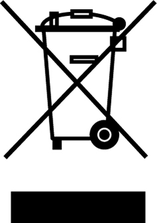 Electrical and electronic devices contain valuable, recyclable materials and often components such as batteries, rechargeable batteries or oil, which - if handled or disposed of incorrectly - can pose a potential danger to human health and the environment. However, these components are required for the correct operation of the device. Devices marked by this symbol are not allowed to be disposed of together with the household rubbish.
Current information on content materials can be found at: www.kaercher.de/REACH
Our local KÄRCHER branch will be happy to help you if you have any questions or problems with the device.
Only use original accessories and original spare parts. They ensure that the appliance will run fault-free and safely.
Information on accessories and spare parts can be found at www.kaercher.com.
The scope of delivery for the appliance is shown on the packaging. Check the contents for completeness when unpacking. If any accessories are missing or in the event of any shipping damage, please notify your dealer.
The warranty conditions issued by our relevant sales company apply in all countries. We shall remedy possible malfunctions on your appliance within the warranty period free of cost, provided that a material or manufacturing flaw is the cause. In a warranty case, please contact your dealer (with the purchase receipt) or the next authorised customer service site.
Further information can be found at: www.kaercher.com/dealersearch
Further warranty information (if available) can be found in the service area of your local KÄRCHER website under "Downloads".
 | |
|---|---|
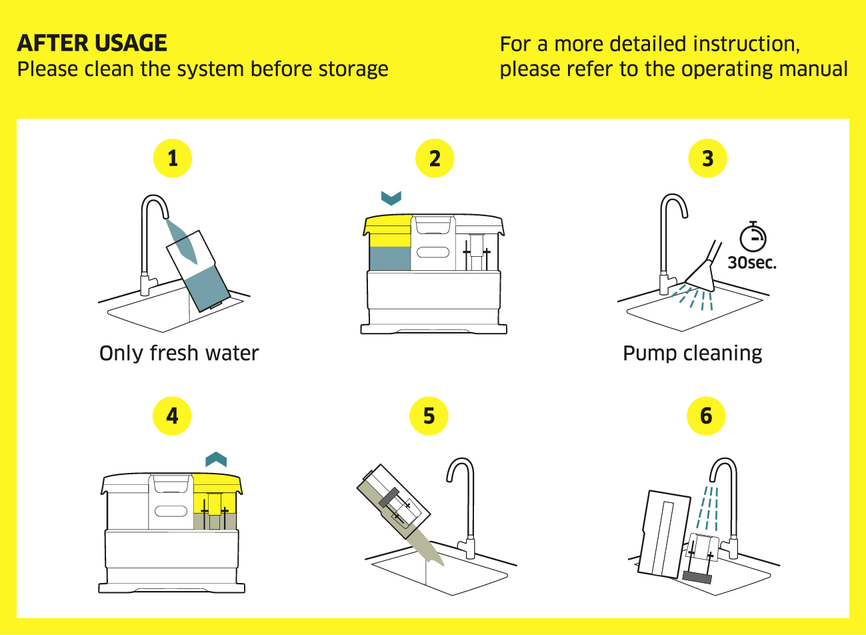
There is a label on the inside of the waste water tank, which describes how to clean the device before storing it. For a description of steps 1 - 6, see chapterCleaning the device |
The device is equipped with different equipment depending on the model selected. The specific equipment is described on the device packaging.
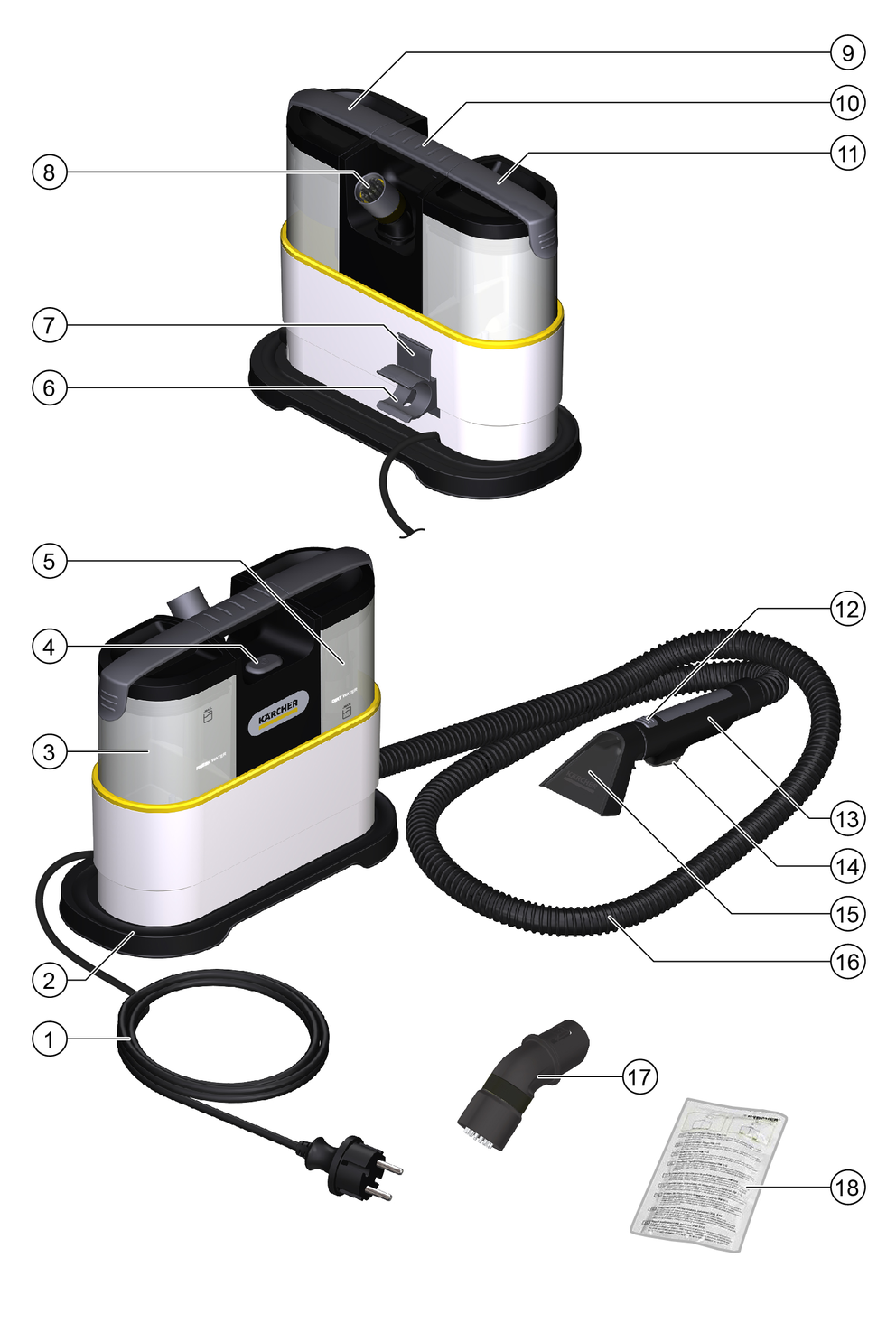
* depending on different configurations
Remove the accessories from the fresh water tank before initial start-up.
As the device does not have a dry vacuum function, if necessary remove coarse-grained dirt (e.g. crumbs) with a commercially available vacuum cleaner before cleaning the textiles.
Only switch on the device when the fresh water tank and waste water tank are installed.
The fresh water and waste water tanks must be firmly seated in the device.
The use of unsuitable detergents can damage the device and result in loss of eligibility for warranty claims.
If necessary, use KÄRCHER SE detergent for cleaning upholstery. The following information applies to the dosage and application of the cleaning agent:
Mixing ratio: 25 - 50 ml detergent to 1 litre fresh water (depending on the degree of soiling).
Dosing aid: 1 cap = 20 ml.
For this unit, this means a dosage of approx. 40 - 75 ml (2 - 4 caps) for a full fresh water tank.
The total filling quantity of the fresh water tank is a maximum of 1.5 litres.
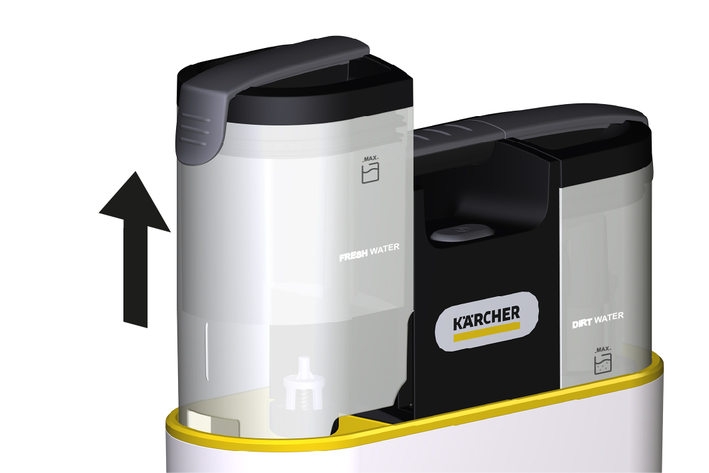
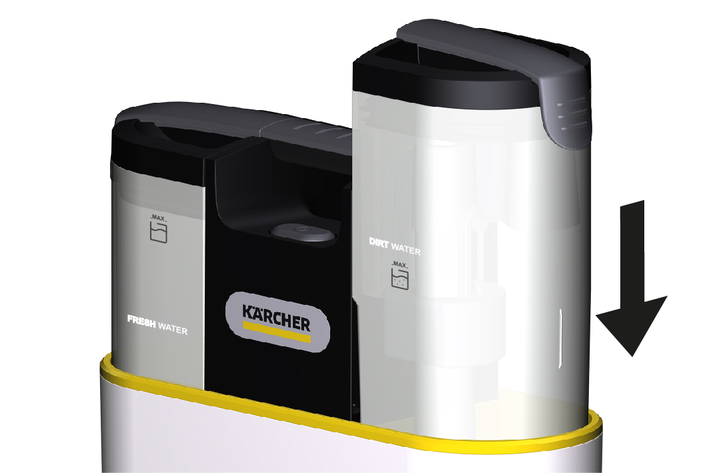
Pull out the tank vertically upwards using the handle.
Fill the fresh water tank.
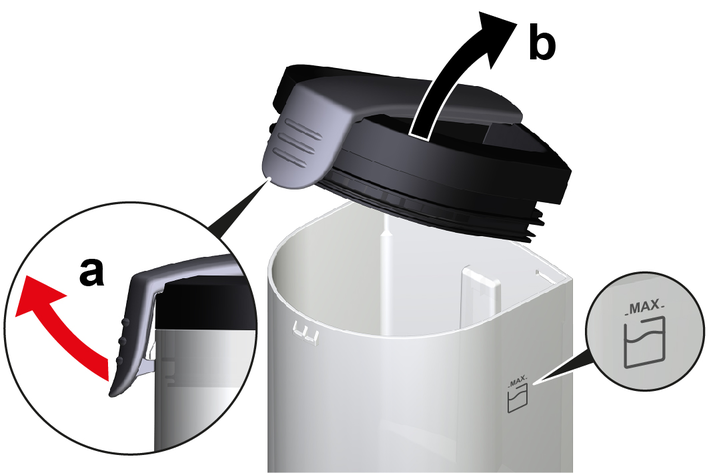
Pull the tank cap slightly upwards to unlock the cap.
Remove the petrol cap.
Fill the tank with tap water up to the "MAX" marking.
Install the petrol cap.
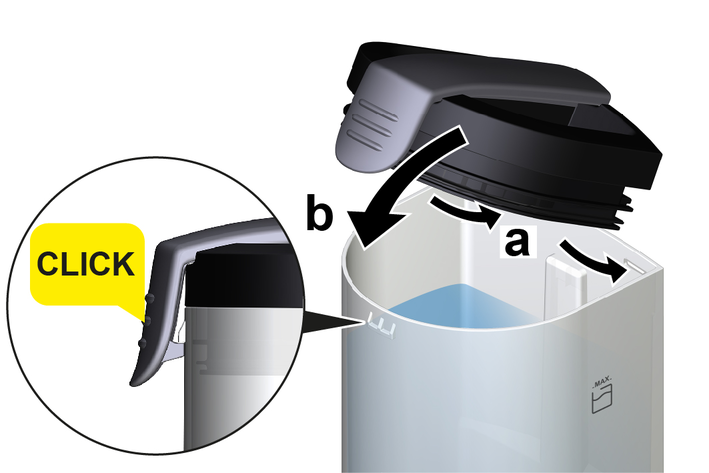
Insert the two tabs on the back of the petrol cap into the two narrow tank openings.
Reattach the petrol cap until you hear it click into place.
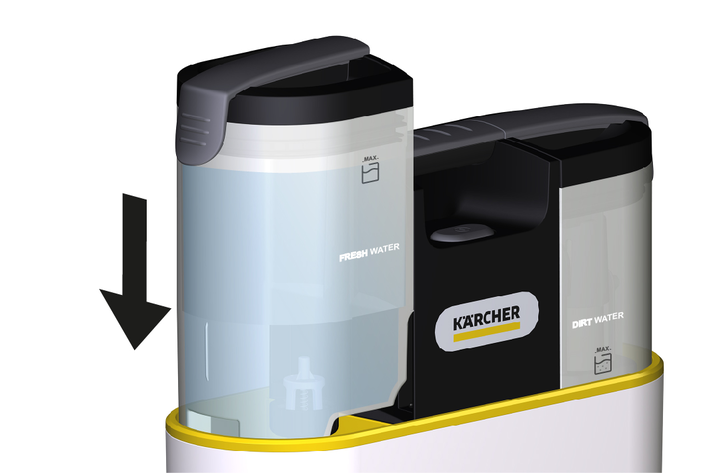
Press the tank completely down by the handle.
Insert the spray nozzle into the nozzle holder up to the collar.
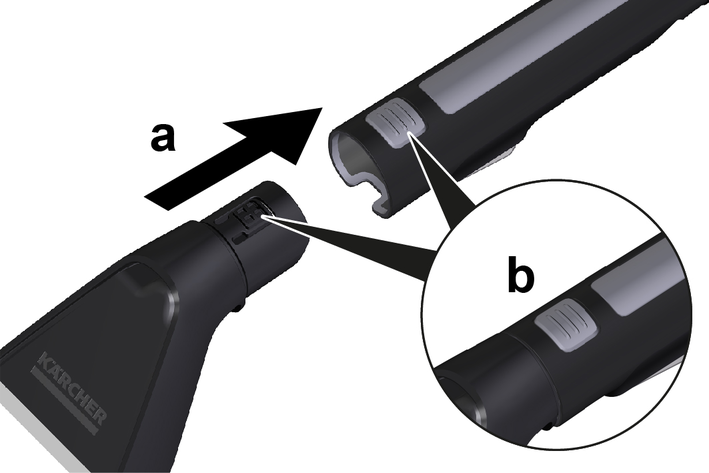
Removing the spray nozzle
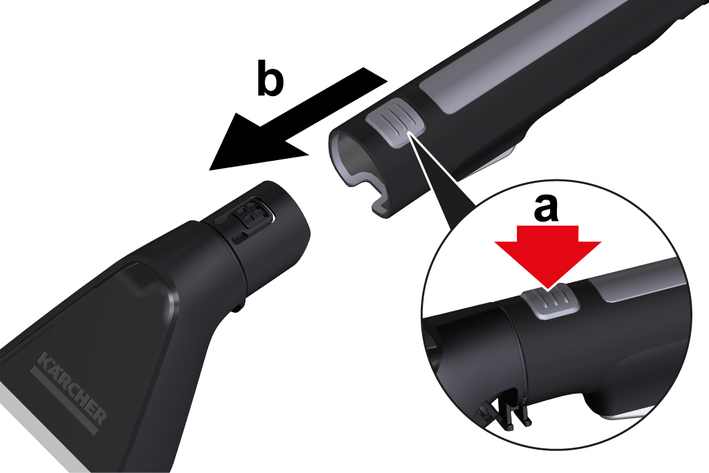
Press the unlocking button.
Remove the spray nozzle from the nozzle holder.
Insert the spot brush into the nozzle holder up to the collar, in the same manner as the spray nozzle.
Remove the spot brush in the same manner as the spray nozzle.
Press the unlocking button.
Remove the spot brush from the nozzle holder.
Risk of electric shock
If the power cable is not completely unwound, the danger exists of you straining and damaging the mains cable by overestimating the range of the cable.
Always completely unwind the power cable.Prerequisites:
The fresh water tank is filled and engaged. See chapter Filling the fresh water tank.
The waste water tank is empty and engaged. See chapter Emptying the waste water tank.
The mains cable is completely unwound.
The suction hose is completely unwound.
Plug the mains plug into a mains socket.
Press the On / Off switch.
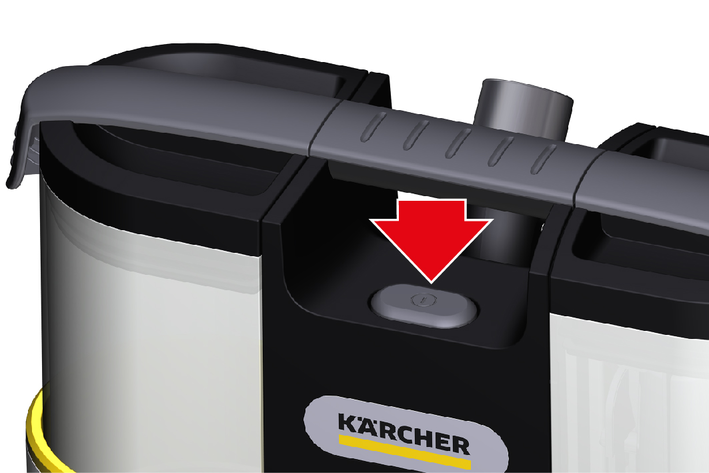
The device starts.
Warm water (maximum 50 °C) increases the cleaning effect.
Only use KÄRCHER SE detergent for cleaning.
Danger from cleaning solution
Risk of damage
Before using the device, check the object to be cleaned for colour fastness and water resistance in an inconspicuous place.Fill the fresh water tank with water and/or detergent, see chapter Filling the fresh water tank.
Switch the device on, see chapter Turning on the device.
Press and hold the spray button.
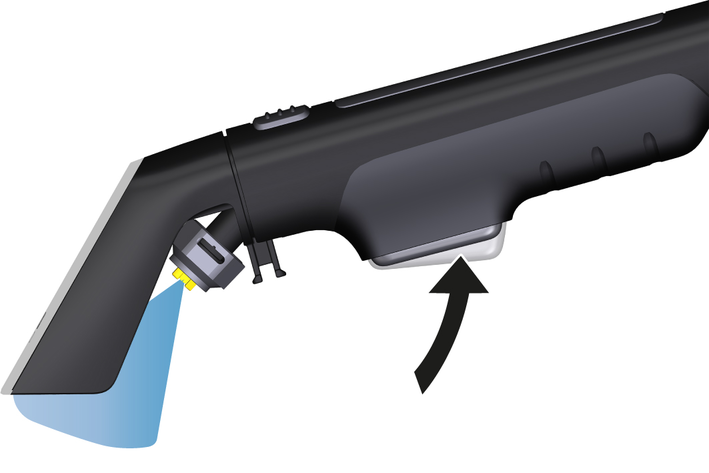
Water and/or cleaning solution is sprayed.
To stop spraying, release the spray button.
In case of heavy contamination, allow the cleaning solution to act for at least 5 minutes.
Pull the spray nozzle backwards over the surface to be cleaned in overlapping paths, do not push.
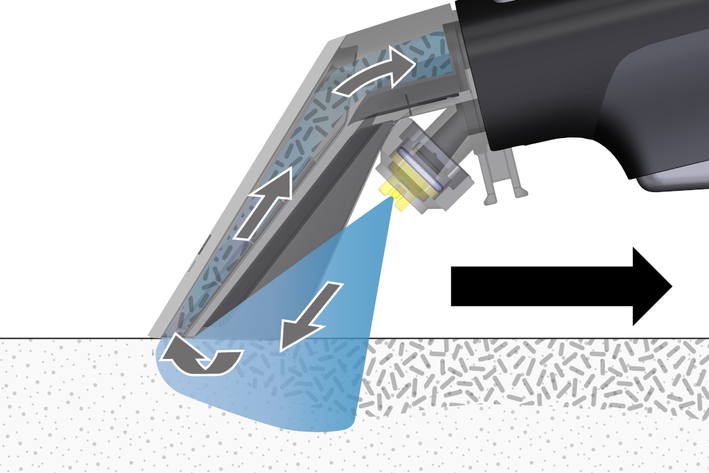
Suck off any residues of the cleaning solution.
Repeat the process if necessary.
To remove cleaning agent residues, clean with clear, warm water.
Using the spot brush enables additional fibre-deep cleaning of stubborn stains on textiles.
For optimum results, first remove the dirt with the upholstery nozzle to avoid rubbing dirt in deeper. Then clean the fabric with a brush.
As soon as the waste water has reached the "MAX" filling level, the waste water tank must be emptied.
Switch off the appliance, see Chapter Switching off the device
Pull the tank vertically upwards using the handle.
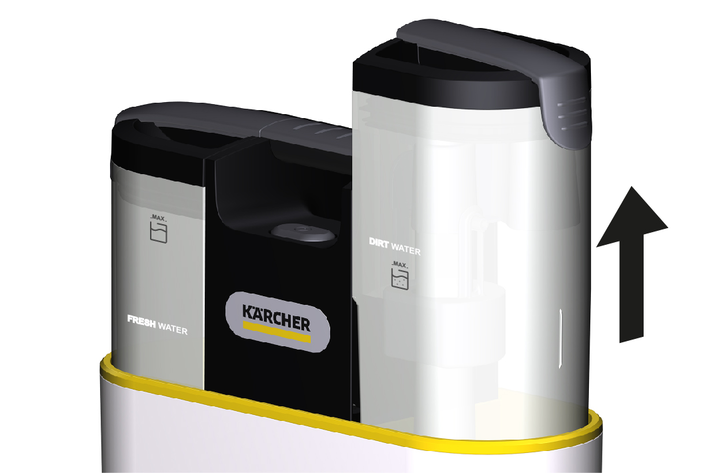
Empty the waste water tank.
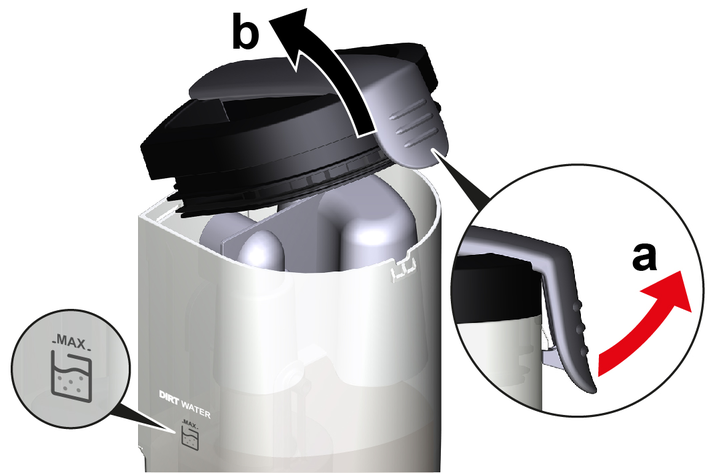
Unlock the tank cap.
Remove the petrol cap.
Dispose of the waste water.
Remove the float from the waste water tank and rinse both parts thoroughly with tap water.
Attach the petrol cap and press downwards until you hear it click into place.
To allow any remaining liquid to dry without leaving any residue, do not latch the petrol cap when cleaning work is complete, but leave it slightly open.
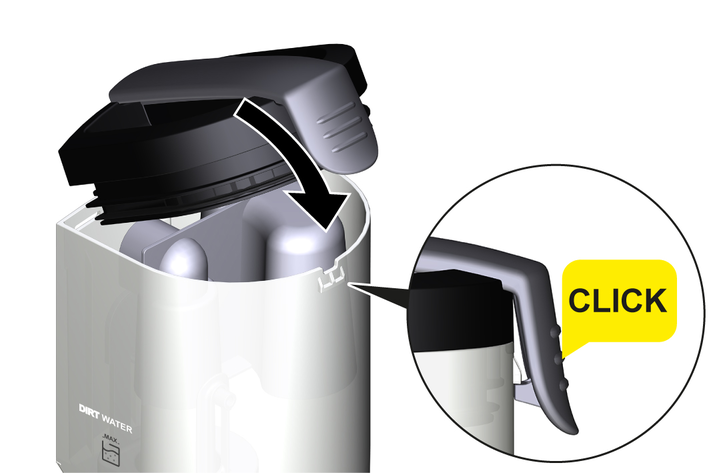
Press the tank completely down by the handle.
Press the On / Off switch.
The device stops.
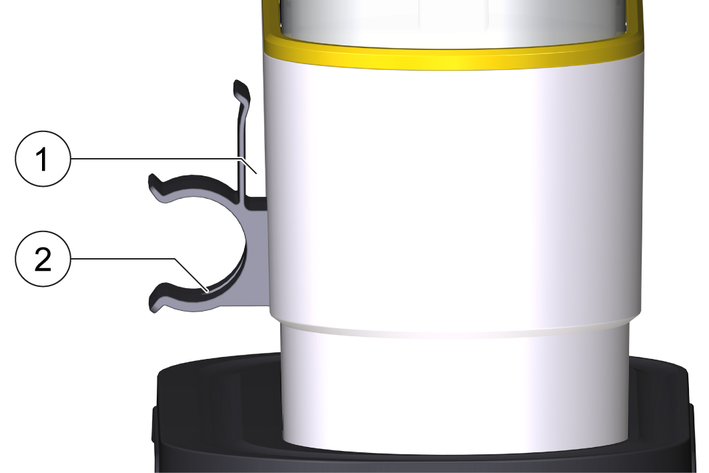
Wrap the spray vacuum hose with spray nozzle around the device.
Press the spray vacuum hose into the support.
Wind the mains cable around the device, guiding the mains cable through the support.
Store the device in a dry and frost-free room.
Risk of injury or damage due to the weight of the device!
Injury and damage.
Be aware of the weight of the device during transport and storage.Lift and carry the device by the carrying handle.
Secure the device against slipping and tipping over.
Clean the device and plastic accessory parts with a commonly available plastic cleaner.
Rinse the container and accessories with water, as necessary, and dry them before further use.
If the spray jet is uneven, the spray nozzle of the spray extracting accessory can be damaged by residues and will need to be cleaned.
Remove the spray nozzle, see chapter Installing and removing the spray nozzle.
Clean the spray nozzle under running water.
Install the spray nozzle, see chapter Installing and removing the spray nozzle.
Clean the system after each use to remove residues such as dirt and cleaning agents and to prevent damage to the unit.
Before the system cleaning, the device must be switched off and the fresh water tank must be free of residual water with detergent.
Steps 1 - 6, which are required for the cleaning the system, can be found on a label on the inside of the waste water tank, see chapter Symbols on the device
Remove the fresh water tank and fill it halfway with fresh water.
Reinsert the fresh water tank into the device, see chapter Filling the fresh water tank.
To clean the system, switch on the device and activate the spray nozzle for 30 seconds.
Additional option for system cleaning:
Insert the spray nozzle fully into the fresh water tank and switch on the device. Cleaning is complete as soon as the fresh water tank is completely empty.
Remove the waste water tank.
Empty the waste water tank, see chapter Emptying the waste water tank.
Remove the float from the waste water tank and thoroughly clean both parts with fresh water.
After completion of the system cleaning:
Insert the float into the waste water tank, then place the waste water tank back into the device; see chapter Emptying the waste water tank.
Switch off the device.
Pull the mains plug out of the outlet.
If contaminated, also rinse the fresh water tank with clear water and clean the filter, see chapter Cleaning the fresh water tank filter.
Replace both petrol caps, but do not lock them, leave them slightly open (drying position) so that any remaining liquid can dry without leaving any residue.
Pay attention to the labelling on the tank caps and the imprints on the tanks to avoid confusion.
Clean the spray nozzle, see chapter Cleaning the spray nozzle.
Allow the device and accessories to dry.
A filter is fitted to the bottom of the fresh water tank, on which dirt particles can settle and thus hinder the water flow. We therefore recommend cleaning the filter regularly.
To clean the filter, the fresh water tank must be completely emptied and removed from the device.
Pull the tank upwards out of the device using the handle.
Remove the filter.
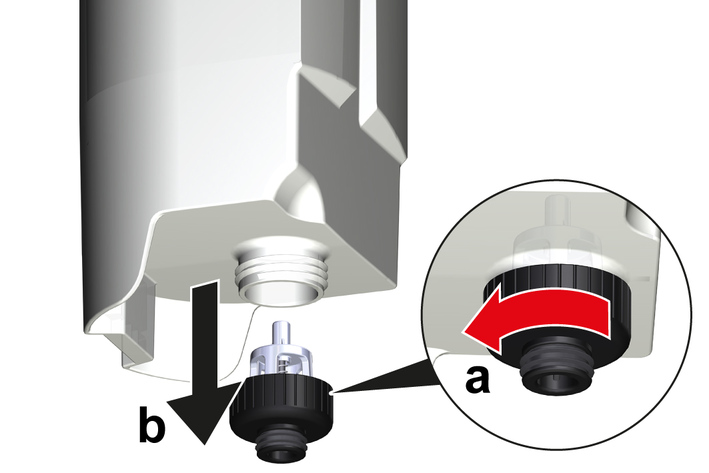
Unscrew the support.
Pull the support with filter downwards out of the tank.
Rinse the filter thoroughly with water or clean it carefully with a soft brush.
Install the filter.
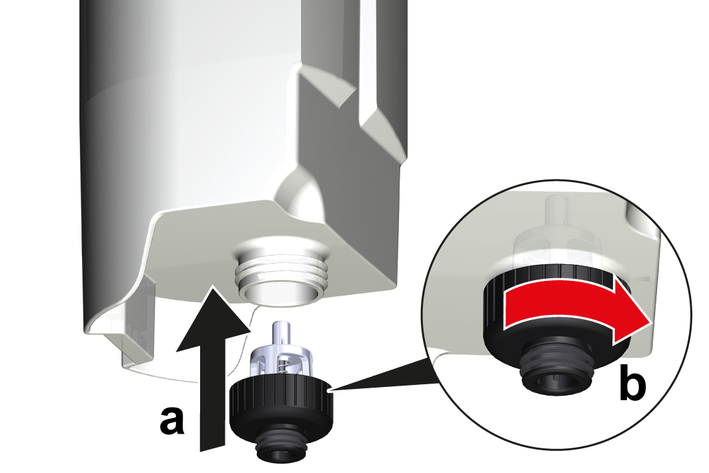
Push the support with filter upwards into the tank.
Screw the support tight.
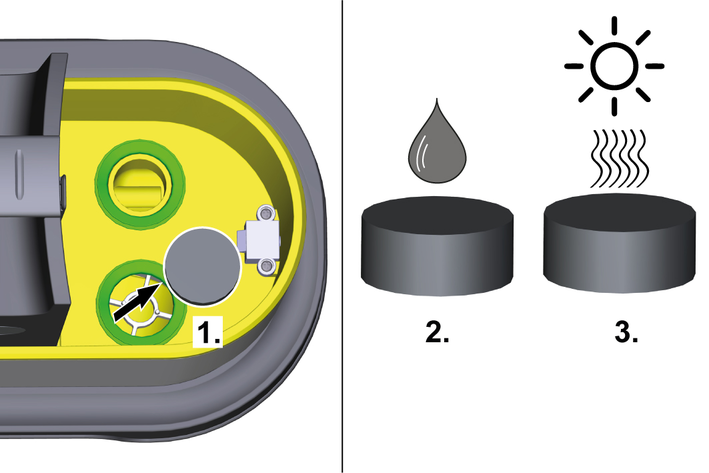
There is a foam motor protection filter under the dirty water tank in which cleaning residues can accumulate and reduce the suction power.
The motor protection filter must therefore be cleaned if necessary.
To clean the motor protection filter, the dirty water tank must be removed from the unit and emptied.
Pull the tank upwards out of the device using the handle.
Pull the motor protection filter out of the support.
Rinse the motor protection filter under running water and then carefully squeeze it out.
Allow the motor protection filter to dry completely and reinsert it.
Poor suction performance
Cause:
Spray vacuum hose or spray nozzle are blocked.
Remedy:
Remove the blockage.
Cause:
Waste water tank is not positioned correctly.
Remedy:
Check the waste water tank for a correct fit. Press the tank down vertically.
Cause:
The motor protection filter under the recovery tank is soiled with cleaning residues.
Remedy:
Remove the dirty water tank and motor protection filter from the unit and clean the motor protection filter with clean water.
No water emitted from the nozzle
Cause:
Fresh water tank empty
Remedy:
Fill up the fresh water tank.
Cause:
Fresh water tank is not positioned correctly.
Remedy:
Check the fresh water tank for correct seating. Press the tank down vertically.
Cause:
Fresh water filter contaminated.
Remedy:
Clean the fresh water filter.
Cause:
Connection between spray nozzle and nozzle holder not correct.
Remedy:
Establish the correct connection between accessories and nozzle holder.
Cause:
Detergent pump defective.
Remedy:
Request repair by Customer Service.
Cause:
Spray nozzle is dirty.
Remedy:
Clean the spray nozzle.
Cause:
Defoaming agent is required
Remedy:
To prevent foaming, add the following defoaming agents to the waste water tank:
2-4 ml / 1-2 lid caps FoamStop Neutral, (order no. 6.295-873.0) or FoamStop Fruity, (order no. 6.295-875.0).
FoamStop is not included in the scope of delivery.
Electrical connection | |
Frequency | 50-60 Hz |
Voltage | 220-240 V |
Power protection (slow-blowing) | 10 A |
Rated power | 450 W |
Device performance data | |
Max. fresh water filling quantity | 1.5 l |
Max. waste water filling quantity | 0.8 l |
Max. cleaning solution temperature (T in max.) | 50 °C |
Area coverage with full fresh water tank | 2.89 m2 |
Dimensions and weights | |
Weight (without accessories) | 4,0 kg |
Length x width x height | 385 x 215 x 310 mm |
Working width of the nozzle | 75 mm |
Length of the suction hose | 1,8 m |
Mains cable | |
Length | 4,5 m |
Determined values in acc. with EN 60704-2-1 | |
Sound pressure level | 70 dB(A) |
2-2-SC-A5-GS