BRC 40-34 C
59798110 (08/25)
59798110 (08/25)
 Read these original operating instructions and the enclosed safety instructions before using the device for the first time. Proceed accordingly.
Keep both books for future reference or for future owners.
The warranty conditions issued by our relevant sales company apply in all countries. We shall remedy possible malfunctions on your appliance within the warranty period free of cost, provided that a material or manufacturing flaw is the cause. In a warranty case, please contact your dealer (with the purchase receipt) or the next authorised customer service site.
Further information can be found at: www.kaercher.com/dealersearch
Further warranty information (if available) can be found in the service area of your local Kärcher website under "Downloads".
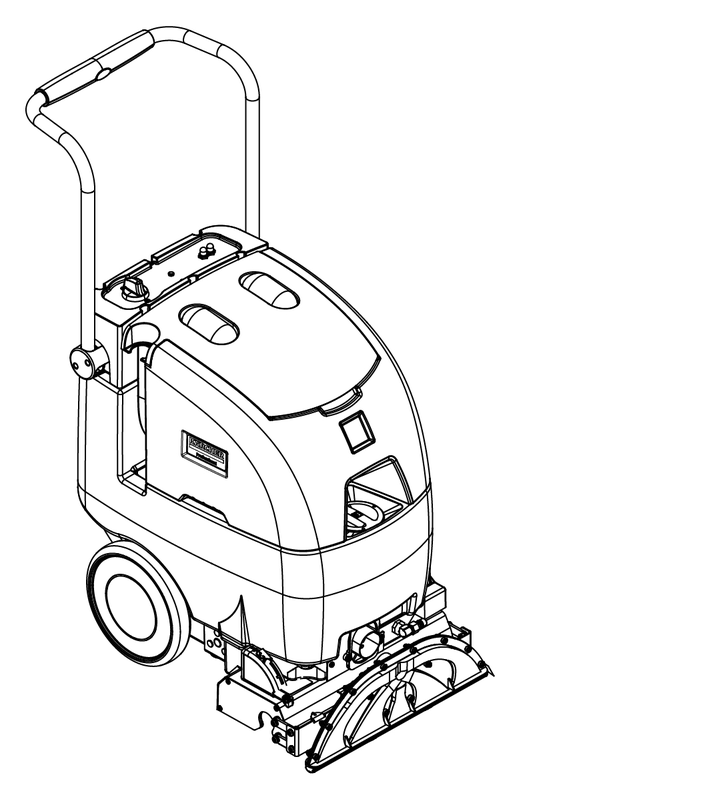
The device sprays cleaning solution from the fresh water tank onto the floor to be cleaned, works the cleaning solution in with a roller brush and sucks up dirt and used cleaning solution into the waste water tank.
The cleaning solution is made up of fresh water and detergent.
The device can be adjusted to suit the respective cleaning task by setting the water volume and detergent volume appropriately.
The device can be adapted to the respective cleaning task by selecting a suitable cleaning programme.
The working width and the capacity of the fresh water tank and waste water tank (see chapter Technical data) enable effective cleaning with a long working time.
If required, an accessory tool (e.g. a manual nozzle) can be connected for cleaning upholstery and steps.
Use the device only in accordance with the information in these operating instructions.
This device is suitable for commercial use, e.g. in hotels, schools, hospitals, factories, shops, and offices.
Only use the device for cleaning hard surfaces that are not sensitive to moisture and polishing.
Do not use the device for cleaning frozen floors (e.g. in cold stores).
Only equip the device with original accessories and spare parts.
Only use the device for cleaning indoor floors.
Before using the device for the first time, read and observe these operating instructions and the accompanying brochure: Safety instructions for brush cleaning devices, No. 5.956-251.0.
The device can tip over
Risk of injury
Do not operate the device on sloping surfaces.Risk of accident due to incorrect operation
People can be injured.
Operators must be properly trained on how to use this machine.The device may only be operated when the hood and all covers are closed.
Danger of injury!
Serious injuries due to missing, modified or ineffective safety devices.
Do not bypass or remove the safety devices and do not render them ineffective. Safety devices are provided for your own protection.Risk of injury from electric shock
Use a plug to connect the device to the mains grid. Permanent connection to the mains grid is prohibited. The plug is used for mains isolation.Only connect the device to an AC power source.Use an extension cable with sufficient diameter (see "Technical data").Unwind the extension cable completely from the cable drum.Unwind the mains cable and place on the ground.
Plug the mains plug into the socket.
 The packing materials can be recycled. Please dispose of packaging in accordance with the environmental regulations.
 Electrical and electronic devices contain valuable, recyclable materials and often components such as batteries, rechargeable batteries or oil, which - if handled or disposed of incorrectly - can pose a potential danger to human health and the environment. However, these components are required for the correct operation of the device. Devices marked by this symbol are not allowed to be disposed of together with the household rubbish.
Current information on content materials can be found at: www.kaercher.de/REACH
The scope of delivery for the appliance is shown on the packaging. Check the contents for completeness when unpacking. If any accessories are missing or in the event of any shipping damage, please notify your dealer.
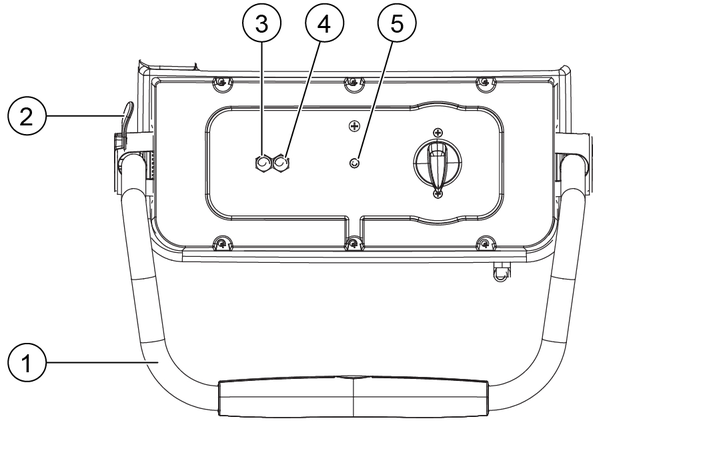
At the optimal speed, the indicator lights up green.
If the speed is too slow, the indicator slowly flashes red.
If the speed is too high, the indicator flashes red quickly.
Danger from detergents
Health risk, risk of damage
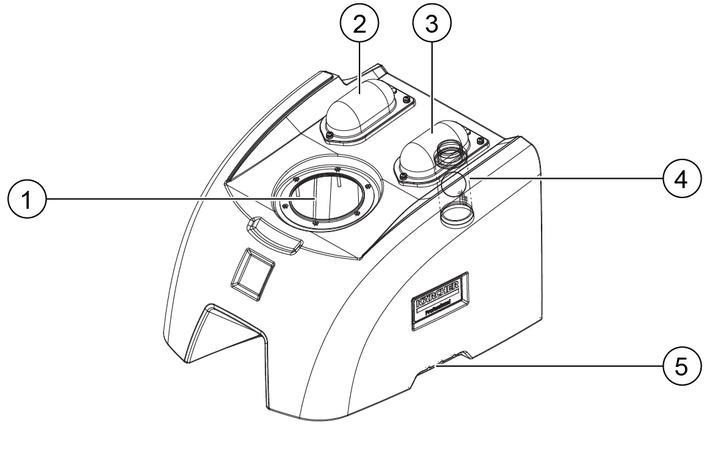
Observe all instructions that are included with the detergents used.Open the filling hole of the fresh water tank.
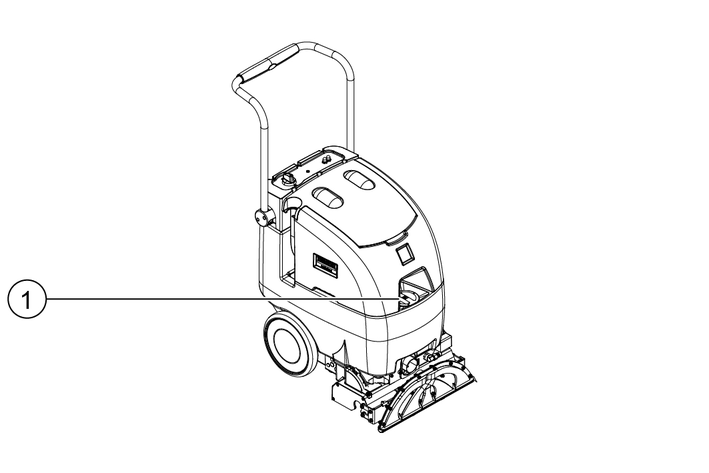
Filling opening
Fill the fresh water tank with water (maximum 60 °C) (capacity 34.1 litres).
Fill with detergent.
Close the filling hole of the fresh water tank.
Application | Detergent |
|---|---|
| Deep carpet cleaning | RM 764 liquid |
Intermediate carpet cleaning | RM 768 iCapsol |
For further information, please request the product information sheet and the DIN safety data sheet for the relevant detergent.
Danger from cleaning solution
Risk of damage
Before using the device, check the object to be cleaned for colour fastness and water resistance in an inconspicuous place.1. Adjust the main handle to a comfortable working position.
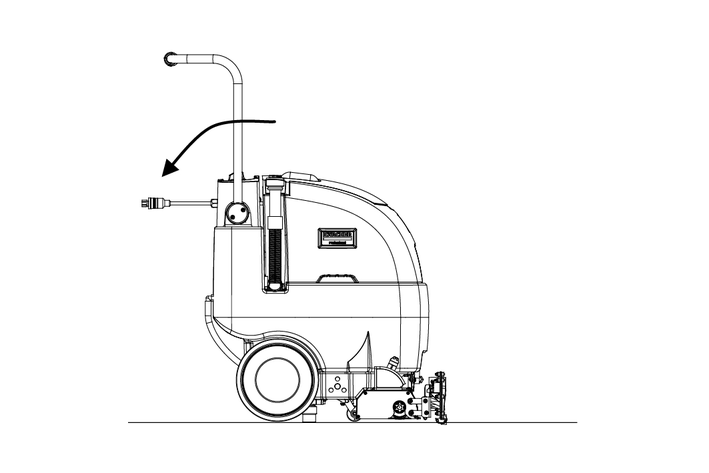
2. Before cleaning, remove loose dirt with a vacuum cleaner.
3. Plug the mains plug into a mains socket.
4. Set the brush height to the correct height for low-pile or high-pile carpets.
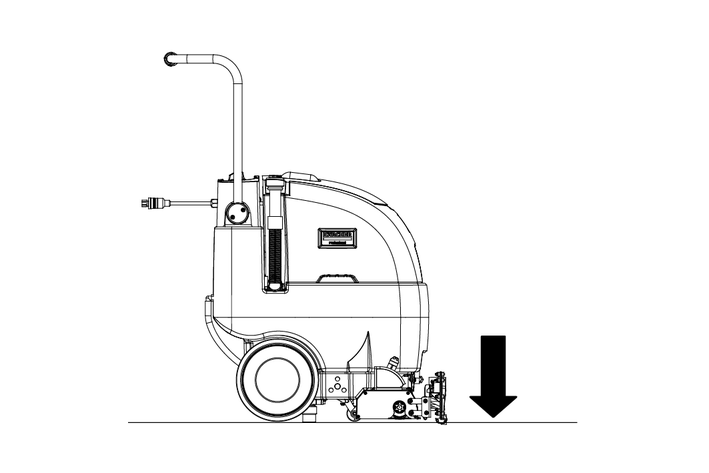
For proper operation, the brush must touch the carpet.
If the circuit breaker is tripped, lift the brush to prevent damage to the motor or carpet.
5. Press the Spray on detergent button.
Observe the smart speed indicator.
6. Release the button about 30 cm before the end of the cleaning cycle.
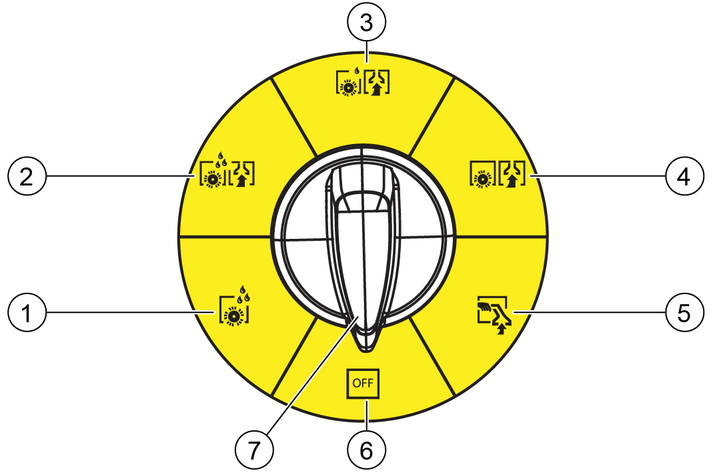
Set the programme switch to Detergent application with suction
Run over the surface to be cleaned in overlapping paths. Pull the device backwards (do not push).
To change the path, press the main handle downwards to tilt the device slightly. The suction bar and cleaning brush are lifted slightly.
To spray on the cleaning solution during operation, press and hold the button on the main handle.
The device is equipped with transparent covers that make it easier for the operator to see the dirty solution and the suction air flow.
Observe the suction cover during operation.
Large quantities of water or foam entering the suction system can damage the suction motor.
Switch the machine off immediately. Empty the waste water tank and/or add defoamer.After cleaning, set the programme switch to Off, return the brush to its storage position and disconnect the mains plug.
Empty the waste water tank via the drain hose and clean with cold water.
Empty and clean the fresh water tank.
Environmental pollution!
Environmental pollution due to improper disposal in waste water.
Observe the local waste water treatment regulations.If the waste water tank is full, set the programme switch to Off.
Move the device next to a suitable drain.
Position the waste water drain hose in the drain, remove the cap and empty waste water tank.
Before cleaning, pre-treat heavily soiled carpets as follows.
To spray on the cleaning solution, set the programme switch to Two-step method.
Pull the device backwards over the surface in overlapping paths (do not push).
Allow the cleaning solution to take effect for 10 - 15 minutes.
Set the programme switch to Eco! mode.
Run over the surface to be cleaned in overlapping paths.
Only use one of the following authorised accessory tools:
Item number | Accessories |
|---|---|
8.600-061.0 | Standard nozzle |
8.600-060.0 | Deluxe professional nozzle |
8.603-154.0 | Hose assembly, CST hand tool U19821 |
Pull back the sleeve and push it onto the fitting on the device side.
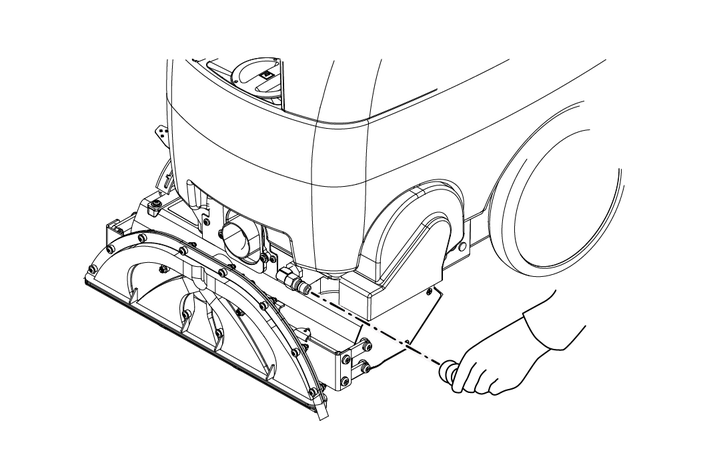
Disconnect the hose from the suction bar. Insert the hose collar into the hose collar of the device.
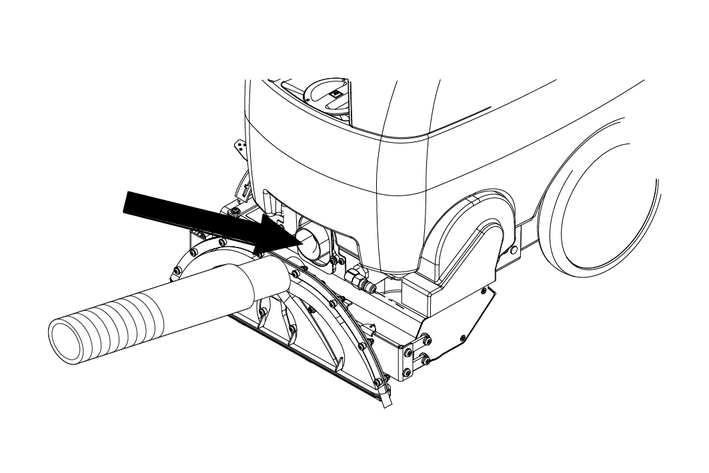
Turn the programme switch to Accessories.
Ensure that the brush is in the storage position.
Actuate the handle on the accessory tool and start cleaning.
Environmental pollution!
Environmental pollution due to improper disposal in waste water.
Observe the local waste water treatment regulations.Set the programme switch to Off.
Move the device to a suitable drain.
Position the waste water drain hose in the drain, remove the cap and empty waste water tank.
Fill the fresh water tank with approx. 4 litres of water (max. 60 °C) and rinse the spray system by pressing the Cleaning solution button.
Pull the mains plug out of the socket.
Remove the cleaning solution hose from the hose nipple and drain the cleaning solution.
Clean the cleaning solution filter.
Rinse the waste water tank with clear water.
Tilt the device backwards and clean the cleaning head and suction bar.
If there is a risk of frost:
Empty the fresh water tank and the waste water tank.
Park the device in a frost-protected room.
Risk of damage to the device due to leaking water.
Empty the waste water tank and the fresh water tank before working on the device.Park the device on a level surface.
Risk of damage!
Risk of damage to the device due to improper cleaning.
Do not spray the device with water and do not use aggressive detergents.Check the power cord, extension cable and hoses for damage before each start-up.
Check the covers and seals for damage.
Check the float switch and clean it if necessary.
Check the cooling air grille (on the frame behind the left-hand wheel) for lint and dirt and clean if necessary.
Check the solvent tank filter and clean it if necessary.
Check the cleanliness of the cleaning brush and clean it if necessary.
Check the suction bar for soiling and clean it if necessary.
Check the spray pattern of the nozzle.
Do not use needles, wires etc. to clean the nozzles as this could negatively affect the spray pattern.
Check all hoses and seals for damage. Have defective parts replaced by Customer Service.
Check the pump pressure of the water pump.
Check the suction bar for damage.
Check the cable for chafe marks. Have defective parts replaced by Customer Service.
The brush is worn if the bristles are the same length as the yellow indicator bristles.
Tilt the device to the rear.
Press the brush end cap inwards and then downwards.
The brush unit and end cap fall downwards.
Pull the brush down far enough to clear the floor of the housing.
Pull the brush out with a rocking motion to release it from the drive hub.
Check whether the end cap and bearing can be turned freely and easily; clean and replace if necessary.
Align the pin on the suction bar support with the corresponding recess on the suction bar.
Press both release levers on the back of the suction bar upwards and pull the suction bar straight off the device. Disconnect the hose from the suction bar.
To install the suction bar, attach the hose to the suction bar.
Push the suction bar onto the pin until the levers on the suction bar engage with the suction bar support.
Check that the suction bar is properly attached by pulling on it carefully and making sure that it does not come loose.
Risk of damage to the device due to leaking water.
Empty the waste water tank and the fresh water tank before working on the device.Contact Customer Service in the case of malfunctions that cannot be corrected using this table.
Indicator | Malfunction | Rectification |
|---|---|---|
No power, device does not run | The mains plug is not plugged in. | Plug the mains plug into the mains socket. |
The programme switch is defective. | Request service. | |
Damaged mains cable or damaged mains plug | Request service. | |
| Suction motor does not run | The suction motor circuit breaker is off. | Switch on the circuit breaker. |
The suction motor circuit breaker is defective. | Request service. | |
Weak suction power | Deposits in the suction bar. | Clean the suction bar. |
The vacuum suction cover seal is defective or missing. | Replace the seal if necessary. | |
The suction hose is torn or the hose collar is loose. | Replace or repair if necessary. | |
Waste water tank full / the float switch ball is stuck in the upper position. | Switch off the suction motor. Empty the waste water tank and rinse it out. | |
Poor or no water flow (carpet is streaky) | The pump motor is not active. | Select a suitable cleaning programme. |
The nozzles are clogged or missing. | Clean with an acidic cleaning solution or replace. | |
The cleaning solution filter is clogged. | Empty the solvent tank. Clean the filter. | |
Brush does not rotate | The brush motor is not active. | Select a suitable cleaning programme. |
The brush motor circuit breaker is off. | Switch on the circuit breaker. |
General | |
Waste water tank capacity | 24.6 l |
Cable length | 12700 mm |
Fresh water tank capacity | 34.1 l |
Spray detergent | 4 quick-change nozzles |
Dimensions | |
Length | 838 mm |
Width without suction bar | 495 mm |
Width suction bar | 406 mm |
Height | 1079 mm |
Tyres | |
Front wheel, width | 50 mm |
Front wheel, diameter | 250 mm |
Weight | |
Net weight (transport weight) | 49 kg |
Device performance data | |
Rated voltage | 230 V |
Power | 7 A |
50 Hz | |
Pump type | Membrane, internal bypass |
Pump power | 100 psi |
Suction | |
Suction Power, Airflow | 2.8 m3/min |
Suction height (max.) | 2970 mm |
Width suction bar | 16-inch injection moulded plastic with spring-loaded downward pressure |
Cleaning Brushes | |
Brush rotation speed | 1000 1/min |
Environmental conditions | |
Water temperature max. | 60 °C |
Only use original accessories and original spare parts. They ensure that the appliance will run fault-free and safely.
Information on accessories and spare parts can be found at www.kaercher.com.
Description | Part no. | Note |
|---|---|---|
Roller brush | 8.000-000.0 | |
Float switch | 8.600-363.0 | Waste water tank |
Transparent cover | 8.397-190.0 | Waste water tank |
Cleaning solution filter | 8.600-797.0 | Fresh water tank |
We hereby declare that the machine described below complies with the relevant basic safety and health requirements in the EU Directives, both in its basic design and construction as well as in the version placed in circulation by us. This declaration is invalidated by any changes made to the machine that are not approved by us.
Product: Scouring and vacuum machine
Type: 1.783-xxx
Currently applicable EU Directives2006/42/EC (+2009/127/EC)
2014/30/EU
2011/65/EU
Harmonised standards usedEN 60335-1
EN 60335-2-68
EN 55014-1: 2006+A1: 2009+A2: 2011
EN 55014-2: 1997+A1: 2001+A2: 2008
EN 61000-3-2: 2014
EN 61000-3-3: 2013
EN 62233: 2008
National standards used-
The signatories act on behalf of and with the authority of the company management.

Documentation supervisor:
S. Reiser
Alfred Kärcher SE & Co. KG
Alfred-Kärcher-Str. 28 - 40
71364 Winnenden (Germany)
Ph.: +49 7195 14-0
Fax: +49 7195 14-2212
Winnenden, 25/01/01
2-2-SC-A4-GS-AW19869