2.042-033.0
00842030 (12/25)
00842030 (12/25)
 Before mounting, read these assembly instructions and the safety instructions, as well as the operating instructions and the safety instructions of the appliance / machine / vehicle.
Keep the assembly instructions, operating instructions and safety instructions for later use or for subsequent owners.
Installation, service and maintenance work may only be carried out by suitably qualified and specially trained specialist personnel.
Indication of an imminent threat of danger that will lead to severe injuries or even death.
Indication of a potentially dangerous situation that may lead to severe injuries or even death.
Indication of a potentially dangerous situation that may lead to minor injuries.
Indication of a potentially dangerous situation that may lead to damage to property.
Risk of damage due to improper installation!
Incorrect installation may result in damage, malfunctions and failures of the device/machine/vehicle.
Assembly, installation and connection may only be carried out by a qualified specialist.Risk of damage due to sharp-edged objects and soiling!
Sharp-edged or dirty objects can cause damage such as scratches, nicks and deformations when they come into contact with components. Dirty tools, cloths and work surfaces can cause irreversible soiling and colour changes.
Only use suitable, undamaged and clean tools and aids, and act with caution. Only place components and devices on clean, padded surfaces.Risk of damage due to improperly installed cables and hoses!
Improperly installed lines and hoses can cause damage, malfunctions and failures of parts or device / machine / vehicle.
Do not kink lines and hoses and do not subject them to tension, compression or torsion.Ensure that the lines and hoses are routed so that they are free from chafing and at a sufficient distance from hot components, and do not run them over corners or edges or over sharp or pointed parts.Do not fall below the smallest permissible bending radii.If necessary, fasten the lines and hoses with suitable means, do not restrict the required degrees of freedom.Lay and secure cables and hoses so that they are not crushed or compressed and do not come into contact with rotating parts such as wheels, rollers, rollers, brushes, etc.Observe the warnings in the chapters!
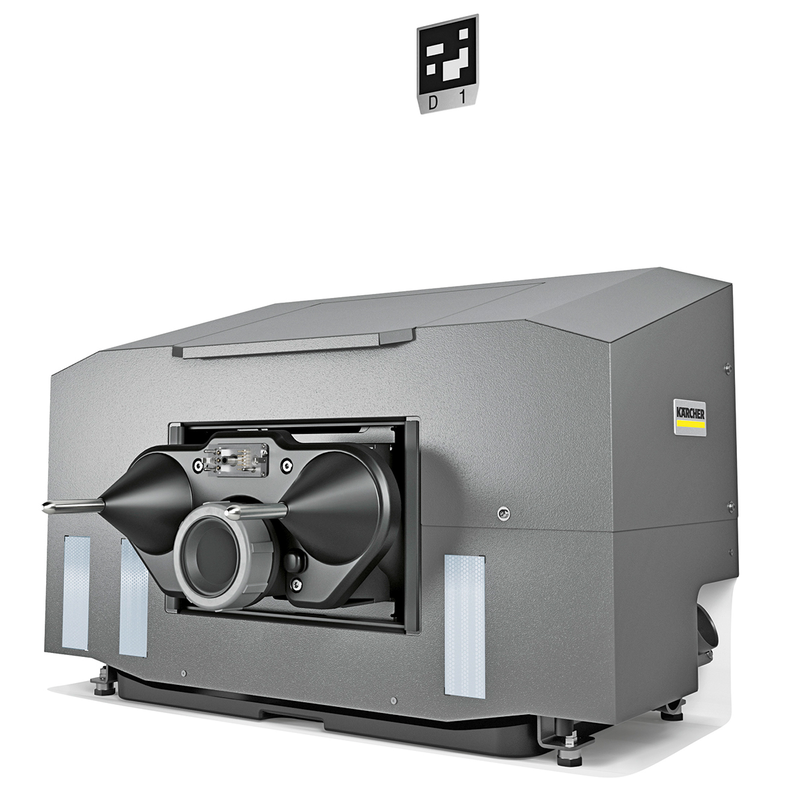
The docking station is suitable for commercial and industrial use, e.g. in production, warehouse and exhibition halls.
The docking station may only be operated with the casing installed.
Any other use is not permitted and considered as improper use.
These assembly instructions describe how to assemble the docking station.
With the docking station, machines of the type KIRA B 200 Perform the following tasks autonomously after docking:
Filling the fresh water tank
Emptying and rinsing the waste water tank
Charging the traction batteries LIB
The docking station may only be operated with the housing attached.
Any other use is not permitted and considered as improper use.
Assembly takes approx. 45 minutes.
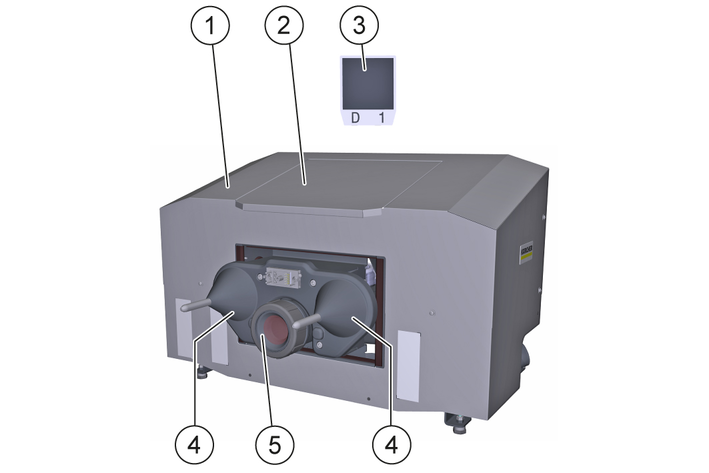
Overview of the unit
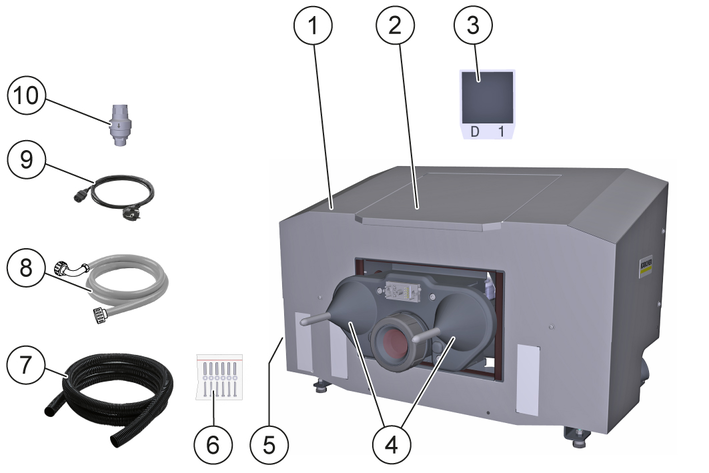
* required, not included in the scope of supply
** optionally available
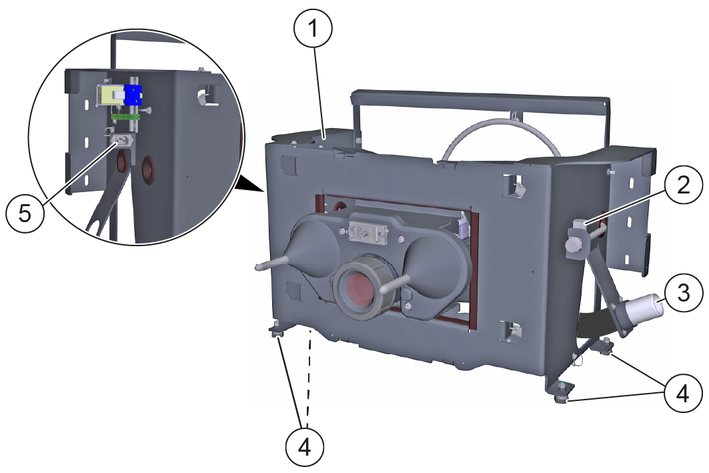
For safe and trouble-free operation, the following requirements must be met at the docking station installation site:
Frost-protected interior that can be accessed by the machine.
Vertical, flat, fixed wall with sufficient holding power (e.g. concrete or vertically perforated brick) for attaching the docking station.
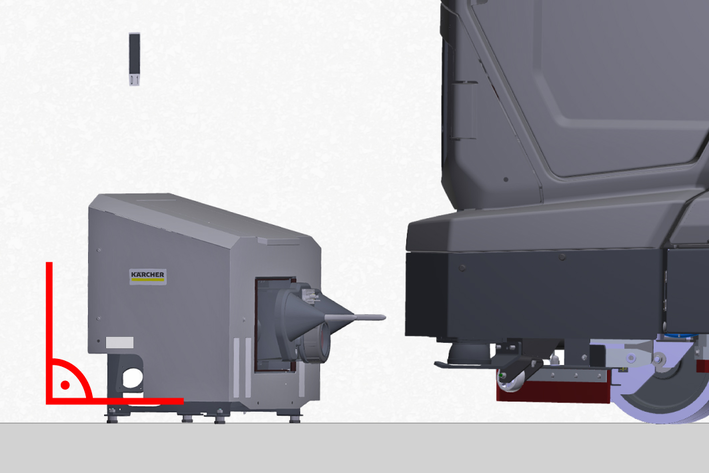
Horizontal, level, enclosed open space with a minimum load-bearing capacity equal to the permissible total weight of the machine.
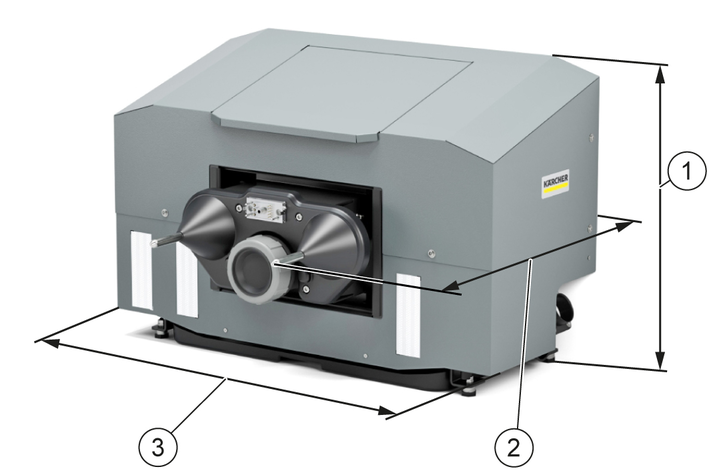
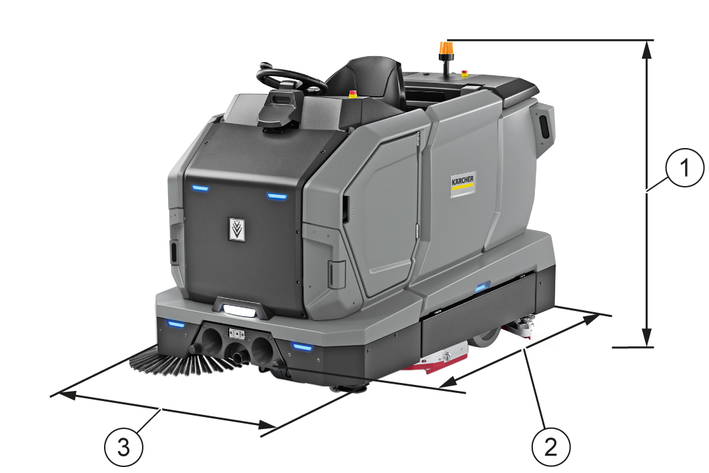
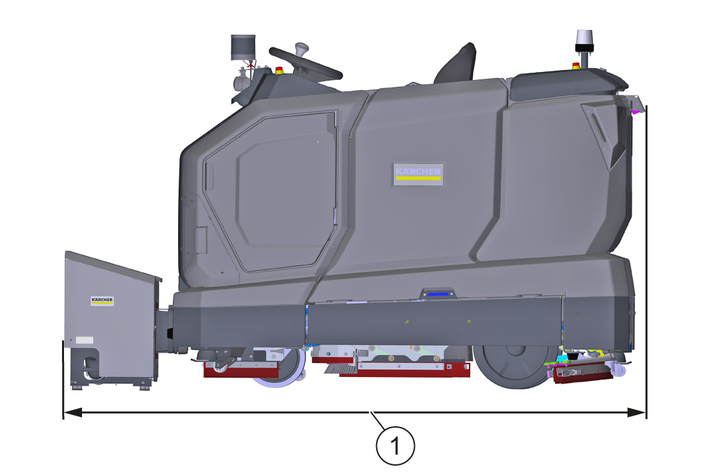
See diagram for minimum dimensions of the open space.
Always keep the open space clear of people, animals and objects.
If necessary, install collision protection devices in the specified areas.
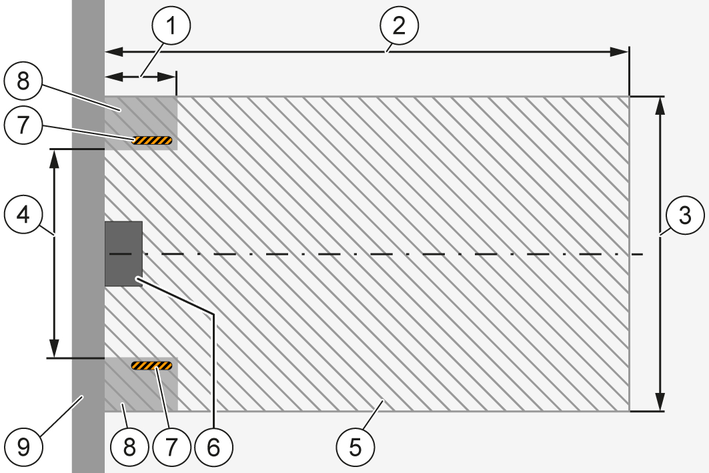
The installation site and the open space must not be located in the vicinity of footpaths or driveways and must not be frequented by the general public.
Mains socket with protective contact available, protected by country-specific residual current device, see for connection values. Technical data.
Fresh water supply point available on the building side, see connection values Technical data.
Waste water disposal point available on the building side. This is ideally designed to be at ground level. However, waste water disposal is guaranteed up to a height of 15 cm.
Disassemble the housing on the docking station.
Place the docking station on the cleaned floor surface and push it against the wall until it is flush.
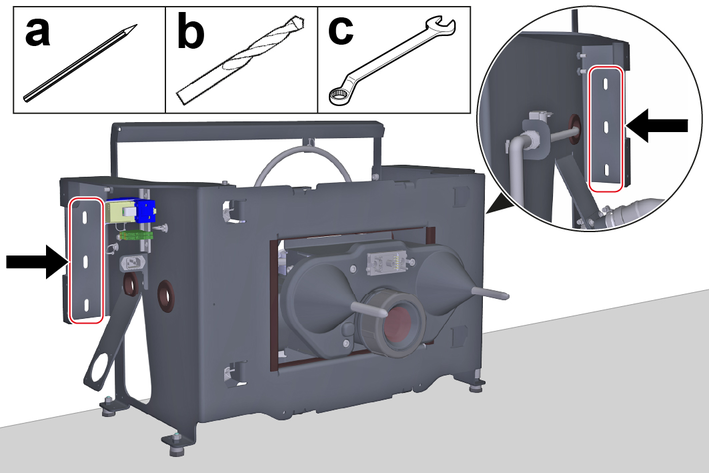
Mount the docking station to the wall:
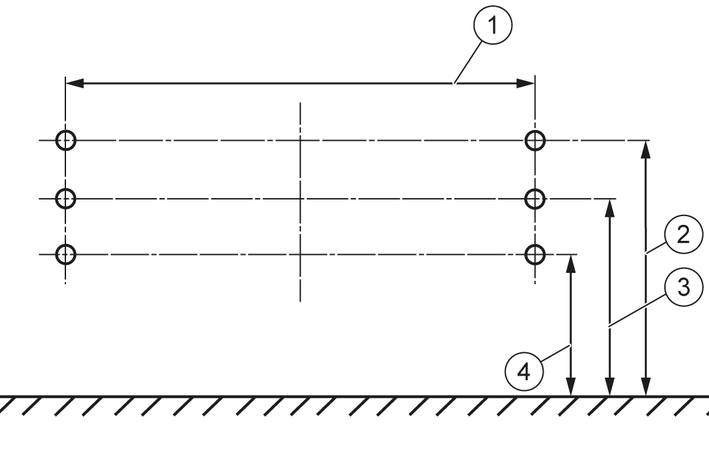
Align the docking station horizontally and mark the outlines of the slots on the wall.
Drill a hole in the center of each marked spot.
This is the only way to adjust the height of the docking station up or down later.
Align the docking station horizontally and secure it to the wall with the screws.
Use fastening materials suitable for the wall type. The screw diameter must 6 mm .
Move the machine centrally in front of the tips of the docking station centring cones.
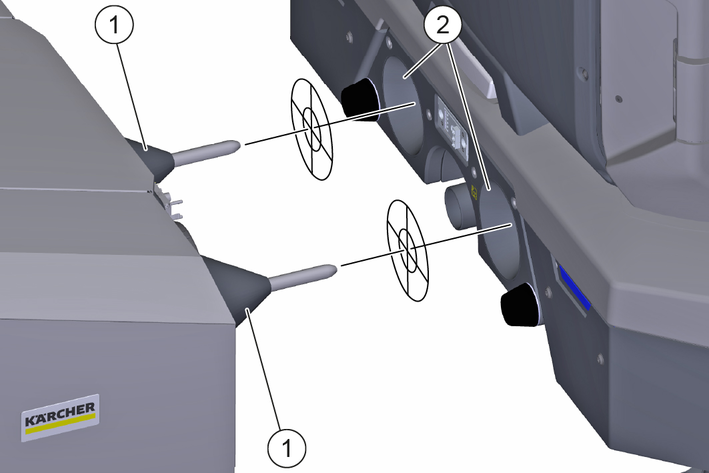
Check that the tips of the centring cones are aligned with the centring cone mounts on the device.
Do not align, measure the height difference and set the mounting height of the docking station accordingly, seeSetting the installation height.
Unscrew the screws securing the docking station to the wall.
Remove the docking station feet and remove or insert the required number of washers.
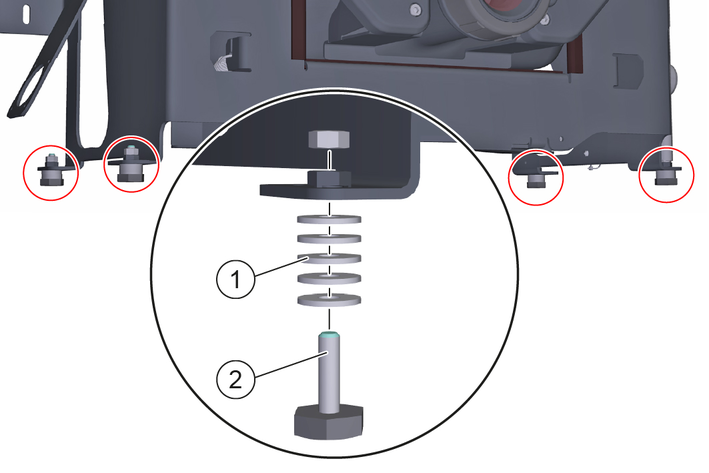
Mount the feet on the docking station.
Mount the docking station horizontally on the wall.
All feet must rest flat on the floor area.
Check the installation height again and repeat the adjustment process if necessary.
Risk of damage due to excessive water supply pressure!
Material damage
Make sure that the maximum permissible water inlet pressure is not exceeded.If necessary, install a pressure reducer.Install a pressure reducer if you cannot determine the water supply pressure.Check the building water supply pressure, see Technical data and adjust if necessary.
If necessary, install a pressure reducer.
Connect the Aquastop hose:
Optionally, screw a water stop valve onto the building’s water tap, see Installing the water stop valve.
Screw the Aquastop hose onto the building's water tap or onto the optional water stop valve.
Route the Aquastop hose to the fresh water solenoid valve on the docking station and screw it on.
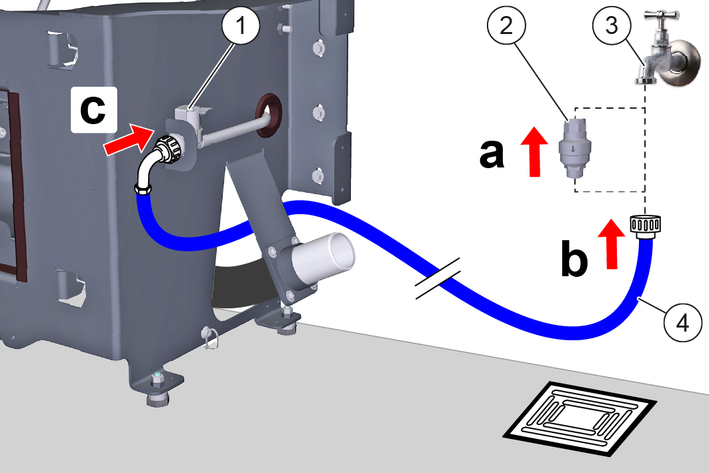
Has the water stop valve triggered during operation:
Eliminate the cause of the triggering.
Reset the water stop valve, see Resetting the water stop valve.
To ensure that no water overflows at the docking station, a water stop valve can also be installed. The water stop valve is mounted between the tap and the Aquastop hose.
Turn off the water supply.
Set the arrow to level 8 (40 litre water flow) with the spanner provided.
The water stop valve can be set from level 1 (5 litre water flow) to level 10 (50 litre water flow) and closes automatically when more than the set amount of water has flowed through without interruption.
Attach the upper end of the water stop valve to the tap.
At the entrance of the water stop valve, an upwardly curved Water filter is installed. If the Aquastop hose has a Filter mounted, it must be replaced by a gasket to ensure the function of the Water Stop Valve.
Attach the AquaStop hose to the thread at the bottom of the water stop valve.
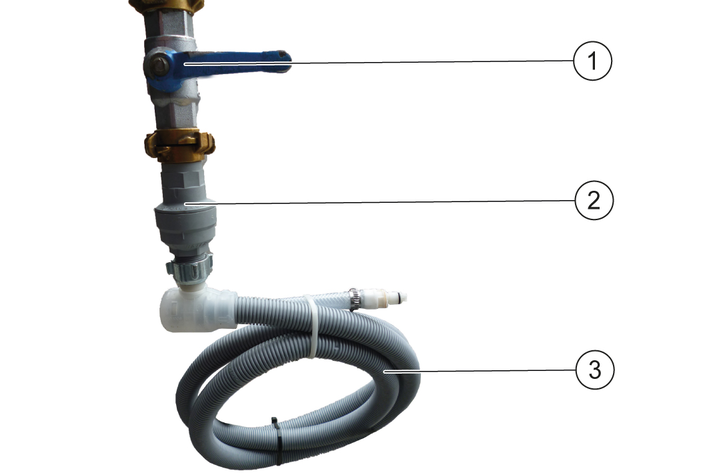
Turn the water supply back on.
Turn off the water supply.
Remove the AquaStop hose.
Turn off the water stop valve and press in the red pin.
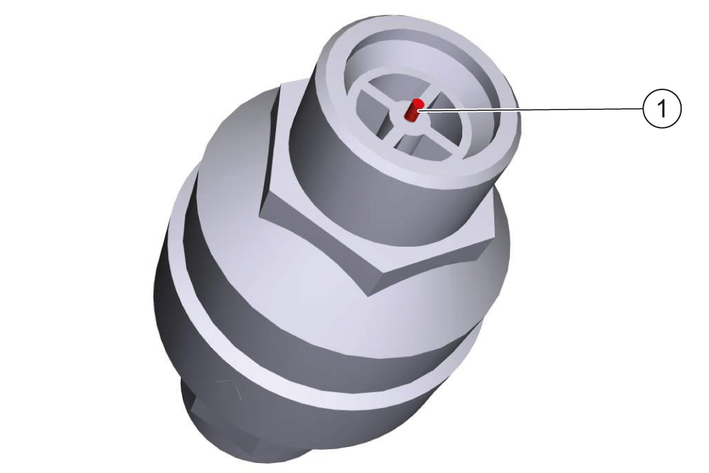
Attach the upper end of the water stop valve to the tap and press in the red pin.
Attach the AquaStop hose to the thread at the bottom of the water stop valve.
Turn the water supply back on
The drain hose is pre-assembled for installation of the appliance to the left of the waste water disposal point. This is the preferred position. However, if it is not possible to install the appliance to the left of the waste water disposal point, the drain hose must be re-assembled, see Conversion of the drain hose.
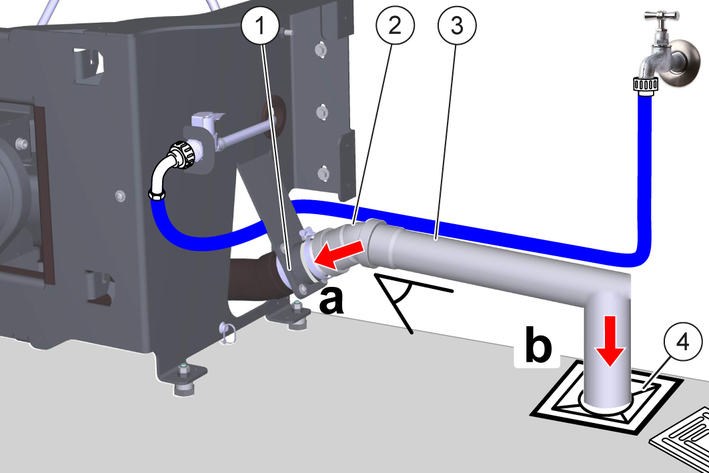
Depending on local conditions, use suitable pipes, hoses, seals, fasteners, adapters and connectors for the connection (illustration shows example with waste water pipe).
Install a suitable waste water pipe:
Fit the elbow connector onto the high-temperature pipe of the dirty water hose connector.
Ensure that the elbow is correctly oriented. The pipe connected to the elbow should have a minimum gradient of 1°.
Starting from the elbow joint, establish a pipe connection to the waste water disposal point.
The pipe diameter must not be less than DN 50 / NPS 2 at any point.
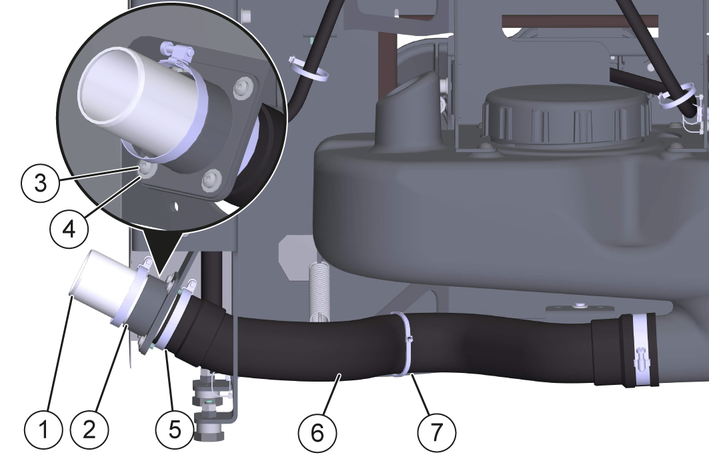
Loosen the hose clamp.
Remove the drain hose from the high-temperature pipe.
Pull the high-temperature pipe out of the connection adapter.
Remove the connection adapter.
Remove the screws and washers.
Remove the connection adapter.
Fit the connection adapter on the opposite side.
Place the connection adapter at the installation point.
Screw on the connection adapter using screws and washers.
Cut through the cable tie and remove it.
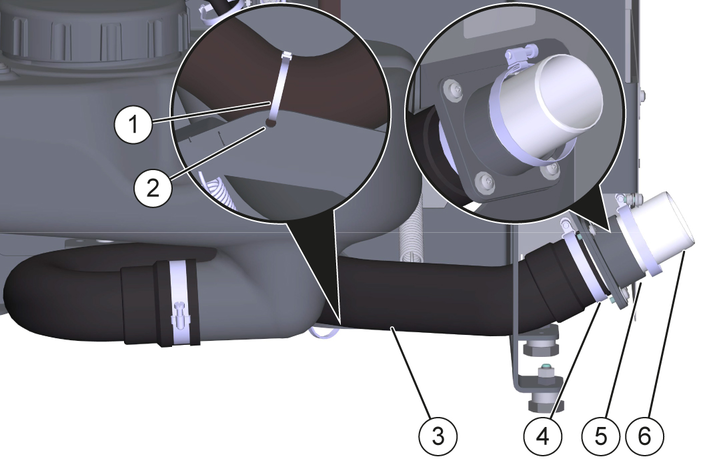
Lay the drain hose on the opposite side.
Observe the minimum bending radius of the waste water hose, see Technical data.
Insert the high-temperature pipe into the connection adapter.
Attach the drain hose to the high-temperature pipe.
Tighten the hose clamp.
Secure the drain hose to hole A with a cable tie.
Danger of death from electric shock.
If the device is operated at a socket without an error current circuit breaker or without a protective contact (earthing), there is a danger of death from electric shock in the event of a fault!
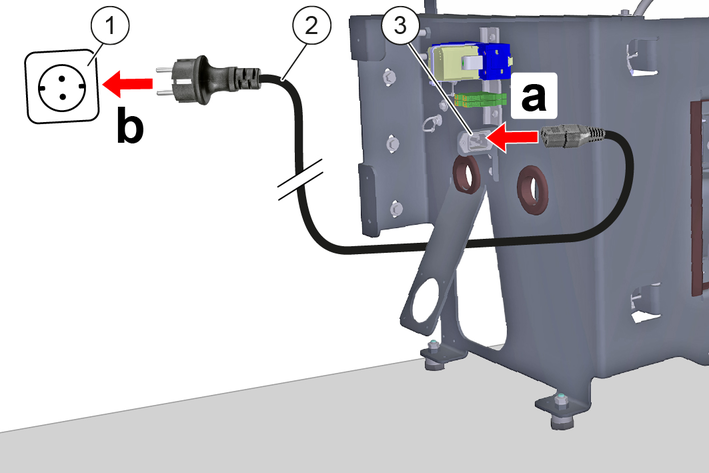
Only operate the device at sockets with an earthing contact and with an error current circuit breaker with a nominal fault current of max. 30 mA.Connect the power cable:
Plug the power cable into the power cable socket on the docking station.
Route the power cable to a power outlet with a protective contact and plug it in.
Do not laminate the position codes or place them in clear plastic sleeves, otherwise malfunctions may occur.
Temporarily mount the housing to the docking station.
Only screw the screws in a few turns.
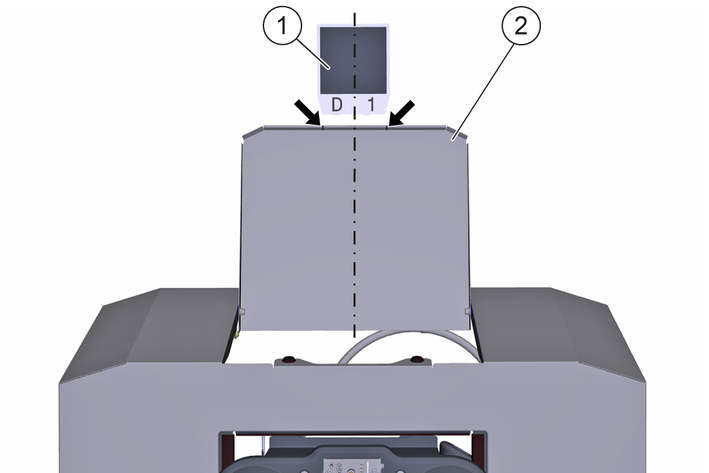
Attach the position code to the wall:
Open the flap until it rests against the wall.
Stick the position code to the wall, centered between the notches (arrows) and a short distance from the flap.
The bonding area must be flat, clean and free of grease.
Close the flap.
Remove the casing at the docking station.
Establish the voltage and fresh water supply.
Dock the machine to the docking station.
Check all water lines, hoses and connections for leaks and eliminate any leaks.
Check the functions:
Filling the fresh water tank
Drain and rinse the waste water tank
Charging the LIB traction batteries
Eliminate any faults.
Undock the machine from the docking station.
Mount the casing.
Danger of death from electric shock if live parts are touched!
Fatal or severe injuries
Do not touch any live parts.Unplug the mains plug from the mains socket before working on the device.Only operate the device with the casing installed.Risk of injury due to sudden start-up of the device!
Serious injuries
Unplug the machine and switch the machine off before performing any work on the docking station.Unplug the mains plug from the mains socket before working on the docking station.For maintenance intervals and maintenance positions, see operating instructionsKIRA B 200.
Risk of damage if cleaned improperly!
Material damage
Do not clean the device with water jets or hard, abrasive utensils, but use only soft, damp cloths.Do not use abrasive or aggressive cleaning agents.Do not rub sensitive surfaces dry.If necessary, clean the following parts with a soft, damp cloth:
Casing
Flap
Position code
Centering cone
Sealing collar
To prevent clogging and leaks, clean the waste water basin and sealing collar weekly and it may be necessary to shorten the interval depending on the composition and amount of waste water.
Pull the mains plug out of the mains socket.
Open the flap until it touches the wall.
Clean the waste water basin inside:
Unscrew the cover on the waste water basin.
Rinse the waste water basin with a water jet.
Screw the cover to the waste water basin.
The sealing ring must be undamaged, clean and correctly installed in the cover.
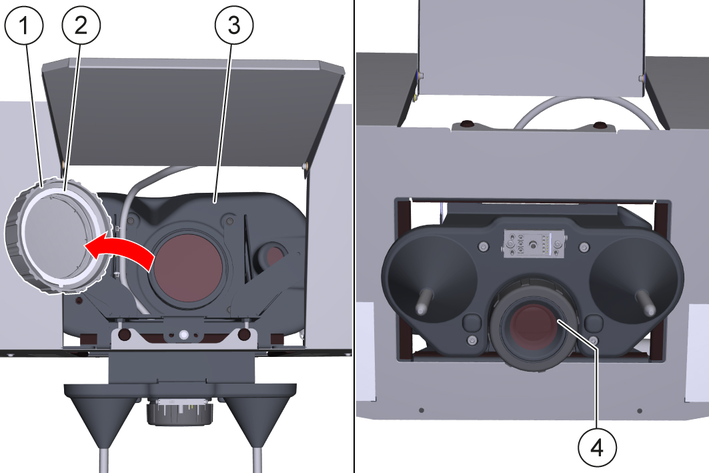
Clean the sealing collar with a damp cloth.
Close the flap.
Insert the mains plug into the mains socket.
To ensure proper functioning, check the mechanical float switch weekly for deposits and clean if necessary. Depending on the composition and quantity of dirty water, it may be necessary to shorten the interval.
Pull the mains plug out of the mains socket.
Open the flap until it rests against the wall.
Check the float switch and clean it if necessary:
Unscrew the lid on the waste water tank.
Check the float switch for deposits through the opening.
Clean the float switch if there are significant deposits.
Screw the lid onto the waste water tank.
The sealing ring must be undamaged, clean and correctly fitted in the lid.
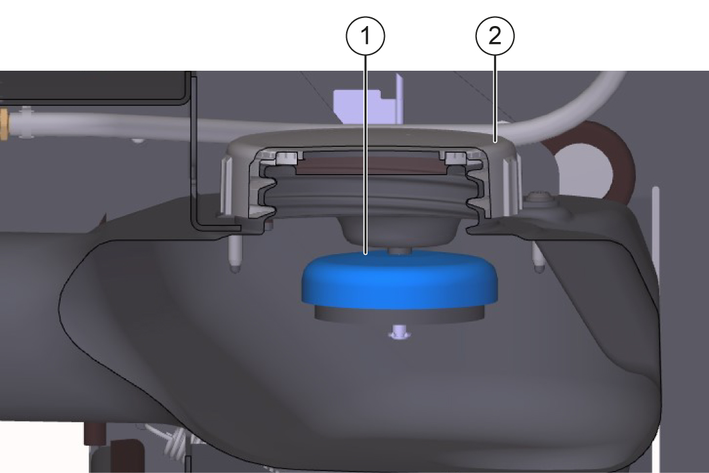
Close the flap.
Plug the power cord into the mains socket.
To ensure that the drain hose functions properly, check it regularly for deposits and clean it if necessary. Depending on the composition and quantity of the dirty water, it may be necessary to shorten the interval.
Pull the mains plug out of the mains socket.
Open the flap until it rests against the wall.
Check the drain hose and clean it if necessary:
Loosen the hose clamp.
Remove the drain hose from the high-temperature pipe.
Check the inside of the hose for deposits.
Clean the drain hose if there are significant deposits.
Attach the drain hose to the high-temperature pipe.
Tighten the hose clamp.
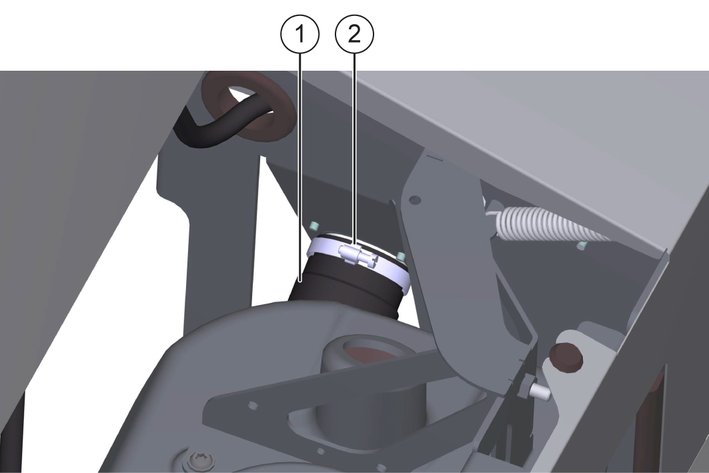
Close the flap.
Plug the power cord into the mains socket.
EU Declaration of Conformity |
We hereby declare that the product named below complies with the relevant provisions of the directives and regulations listed. This declaration is invalidated by any changes made to the product that are not approved by us.
Product: Kira Docking Station
Type: 2.042-xxx
Directives and Regulations2006/42/EC (+2009/127/EC)
2011/65/EU
Harmonised standards usedEN 60335-1
EN 60335-2-72
EN IEC 63327
EN IEC 63000: 2018
Name and addressDocumentation supervisor:
S. Reiser
Alfred Kärcher SE & Co. KG
Alfred-Kärcher-Str. 28 - 40
71364 Winnenden (Germany)
Tel.: +49 7195 14-0
Fax: +49 7195 14-2212

Winnenden, 2025/11/01
The undersigned act on behalf of and with the authority of the Board of Directors.
Alfred Kärcher SE & Co. KG
Alfred-Kärcher-Str. 28 - 40
71364 Winnenden (Germany)
Ph.: +49 7195 14-0
Fax: +49 7195 14-2212
Declaration of Conformity (UK) |
We hereby declare that the product named below complies with the relevant provisions of the directives and regulations listed. This declaration is invalidated by any changes made to the product that are not approved by us.
Product: Kira Docking Station
Type: 2.042-xxx
Directives and RegulationsS.I. 2008/1597 (as amended)
S.I. 2012/3032 (as amended)
Designated standards usedEN 60335-1
EN 60335-2-72
EN IEC 63327
EN IEC 63000: 2018
Name and addressDocumentation supervisor:
S. Reiser
Alfred Kärcher SE & Co. KG
Alfred-Kärcher-Str. 28 - 40
71364 Winnenden (Germany)
Tel.: +49 7195 14-0
Fax: +49 7195 14-2212
Winnenden, 2025/11/01
The undersigned act on behalf of and with the authority of the Board of Directors.
Alfred Kärcher SE & Co. KG
Alfred-Kärcher-Str. 28 - 40
71364 Winnenden (Germany)
Ph.: +49 7195 14-0
Fax: +49 7195 14-2212
Electrical connection | |
Rated voltage | 100-240 V |
Protection type | IPX3 |
Frequency | 50-60 Hz |
Power | 2250 W |
Water connection | |
Feed pressure (max.) | 1,0 MPa |
Input temperature (max.) | 50 °C |
Minimum bending radius of waste water hose | 65 mm |
Lifting unit requirement | |
Pumping capacity of the wastewater lifting station | ≥ 6,5 m3/h |
max. flow performance | 25 - 30 l/min |
Minimum slope of waste water pipe | 1 ° |
Dimensions and weights | |
Length x width x height | 864x571x614 mm |
Weight | 43 kg |
Drain opening diameter | DN 50 / NPS 2 |
2-2-SC-A4-GS-17339